
How to Use the TPT Featured Resource Section to Increase Your Sales
Dec 09, 2025
If you’ve ever clicked into someone’s TPT store and immediately found yourself adding three things to your cart… that wasn’t an accident. Their Featured Resource section did exactly what it was supposed to do.
This little strip of resources at the top of your storefront is one of the highest-visibility areas you control. When it’s used well, it can increase pageviews, conversions, and even average order value. When it’s ignored, your best products stay buried where shoppers may never find them.
Today, we’re walking through how it works, how to update it, and what to put there so it actually helps your store grow.
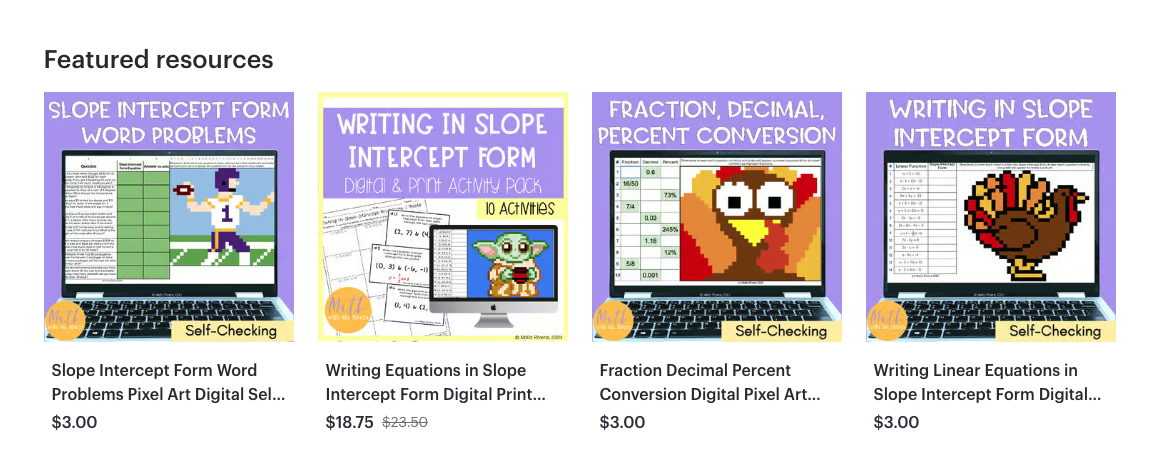
What Is the Featured Resource Section?
The Featured Resource section is the horizontal carousel of products at the top of your TPT storefront. It shows up before your full catalog, so it becomes prime real estate for guiding shoppers toward specific products.
Think of it as your storefront’s “front table display”, the place where you highlight your must-see items, seasonal picks, and top sellers.
How to Add Resources to the Featured Section (Step-by-Step)
Here’s the quickest way to update it:
-
Log into TPT and go to My Dashboard.
-
Click My Store in the sidebar.
-
Select Product Listings.
-
Find the resource you want to feature and click Quick Edit.
-
Check the box labeled “Featured Product.”
-
Save your changes.
-
Repeat for any additional products you want to feature.
TPT will automatically place the most recently updated featured products at the front of the carousel, so the order may change as you update listings.
How to Choose Which Products to Feature
This is where strategy matters. Your Featured section shouldn’t be random — it should guide shoppers toward what they’re most likely to buy right now. Here are the smartest options to rotate in.
1. Seasonal or Time-Sensitive Resources
Shoppers on TPT are often teaching “in the moment.” If a teacher lands in your store in mid-November, they aren’t hunting for back-to-school activities — they’re looking for Thanksgiving practice, resources to use before winter break, or a last-minute sub plan.
Use this to your advantage.
Feature items that match:
-
Upcoming holidays
-
Topics teachers are teaching that month
-
State test prep season
-
Project-based units or review cycles
This helps the right buyers find the right product faster.
2. A High-Value Bundle to Increase Average Order Value
Featuring at least one bundle is a smart upsell strategy. When a buyer clicks into your store and then sees the bundle in your Featured section, they often realize:
- The bundle is a better deal
-
The bundle includes what they came for plus more
Even if shoppers enter your store for one worksheet, your Featured section can nudge them toward a larger, more valuable purchase.
3. A Free Resource to Build Trust
Not everyone is ready to buy right away — especially teachers who are discovering you for the first time.
Featuring a freebie gives them a low-risk way to see your formatting, clarity, rigor, and student-friendly design. If they love the freebie, they’re more likely to buy from you in the same session or return to your store later.
Plus, it can help grow your followers, which means more eyes on your products!
Why You Should Keep Featured Resources Active
If you don’t use your Featured section, you’re missing out on:
More control over where shoppers click.
Most buyers don’t scroll endlessly. When your top four to six resources are strategically chosen, you naturally guide them toward the products that matter most.
Higher conversion rates.
Featured items get more impressions, more clicks, and more conversions simply because of the placement.
Better first impressions.
Your Featured section tells buyers who you are as a seller. Are you organized? Seasonal? Aligned with what they’re teaching? Highlighting well-designed resources shows your professionalism before they ever open a listing.
When You Should Update Your Featured Section
Treat this area like a rotating display, not a “set it and forget it” section.
Update it when:
-
A new season or holiday is approaching
-
Teachers move into a new curriculum unit
-
You release a new product line
-
You want to push a specific bundle
-
You’re prepping for a sitewide sale
-
Your data shows a resource is getting more traction
A good rule of thumb is to update it monthly, or at minimum at the start of each season.
Your Featured Resource section is small but mighty. It guides shoppers, increases visibility, and puts your best offers where buyers are most likely to click. With a little strategy and a quick monthly refresh, it can become one of the easiest ways to grow your TPT store.
If you want help deciding exactly which products to feature based on your own data, I can help you build a rotation strategy that lines up with your store’s traffic, conversion rates, and seasonal trends. Send me an email at malia@maliarivera.com and let's chat!
Do You Want a FREE List of Words & Phrases to Add to Your TPT Listings That Will Make Them Stand Out?
Join my email list and I'll send you my free Big List of Powerful Keywords and Phrases that teachers are ACTUALLY searching for. You can add these to titles, descriptions, thumbnails & more!
We hate SPAM & promise to never send it. Your contact information is safe and never shared.
TPT for Beginners Coach

