
So… What Are TPT Seller Discounts?
Dec 15, 2025
TPT Seller Discounts - What Are They and How Do They Work?
If you've ever thought, "I wish I could offer a coupon in my TPT store", you're not alone! That's exactly what TPT's new Seller Discounts feature is designed to do.
Seller Discounts give sellers a way to offer saving directly inside TPT. Buyers can apply the discount with one click! No promo codes or extra steps needed.
Here is a breakdown of what TPT has shared about the new feature in their recent webinar (click here to watch the replay) and blog post.
What are Seller Discounts?
Seller discounts are discounts you can activate inside your TPT store to encourage purchases. TPT described them as a new way to help incentivize sales and give sellers more flexibility in how they market their own resources.
From the buyer side, the experience is simple. If they're eligible for a discount, they'll see it on your product listing page or at checkout and can apply it with a single click.
The Two Types of Seller Discounts
Before getting into how to set up the discounts, it helps to understand the two discount types: Abandon Card Discount and the Followers Discount.
1) Abandon Cart Discount
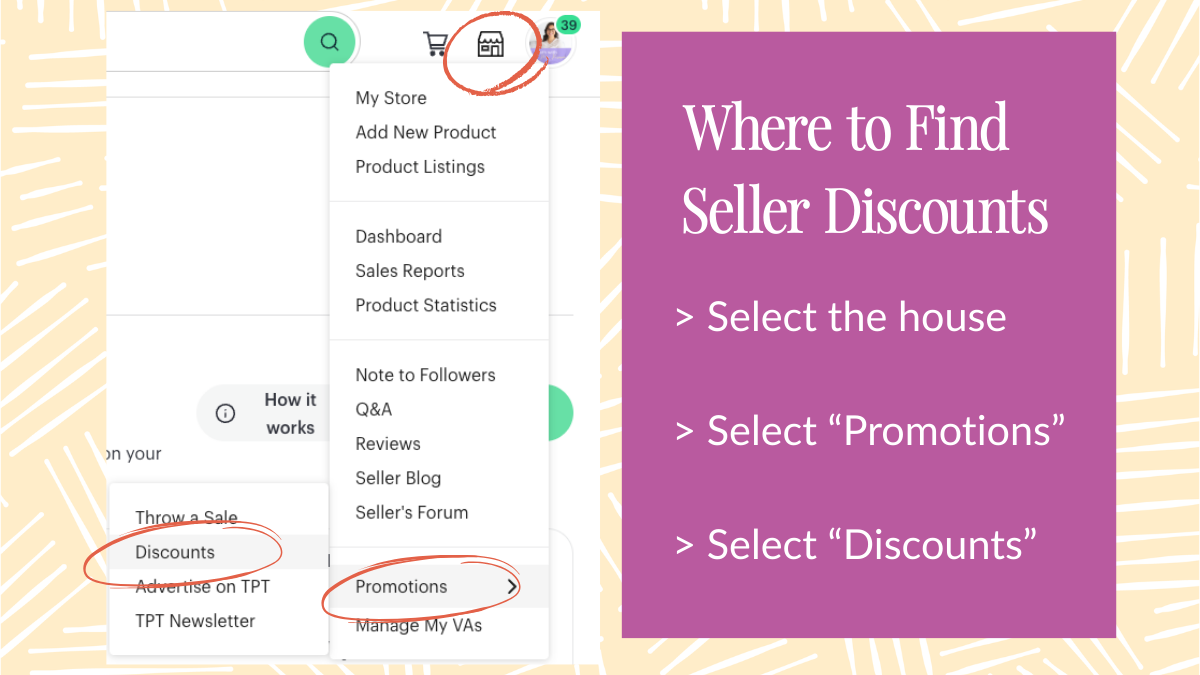
This discount applies to when a buyer adds one of your resources to their cart but doesn't actually purchase. The buyer then leaves the resource in their cart. To help incentivize the buyer to purchase what they've left in their cart, buyers will receive an "abandon cart" email and see the discount offered about an hour after leaving the item(s) in their cart. The discount is 10% off the item(s) in their cart from your store and expires after 7 days of when you turned on the discount.
TPT has historically sent abandon cart emails, and this feature simply adds a discount offer into that existing email flow. This is very similar to how Etsy uses this type of discount for its sellers.
2) Follower Discount
The follower discount is also a 10% discount and expires in 7 days, but it works a little differently. This discount applies to buyers who are already following your store at the time you activate the discount. It can be applied to any products in your store, including bundles.
TPT also clarified in the webinar Q&A that following the seller's store after the discount is activated doesn't make the buyer eligible for that specific discount window. So, you'll need to be strategic with how you use this discount to your advantage!
How to Turn On and Off a Seller Discount(s)
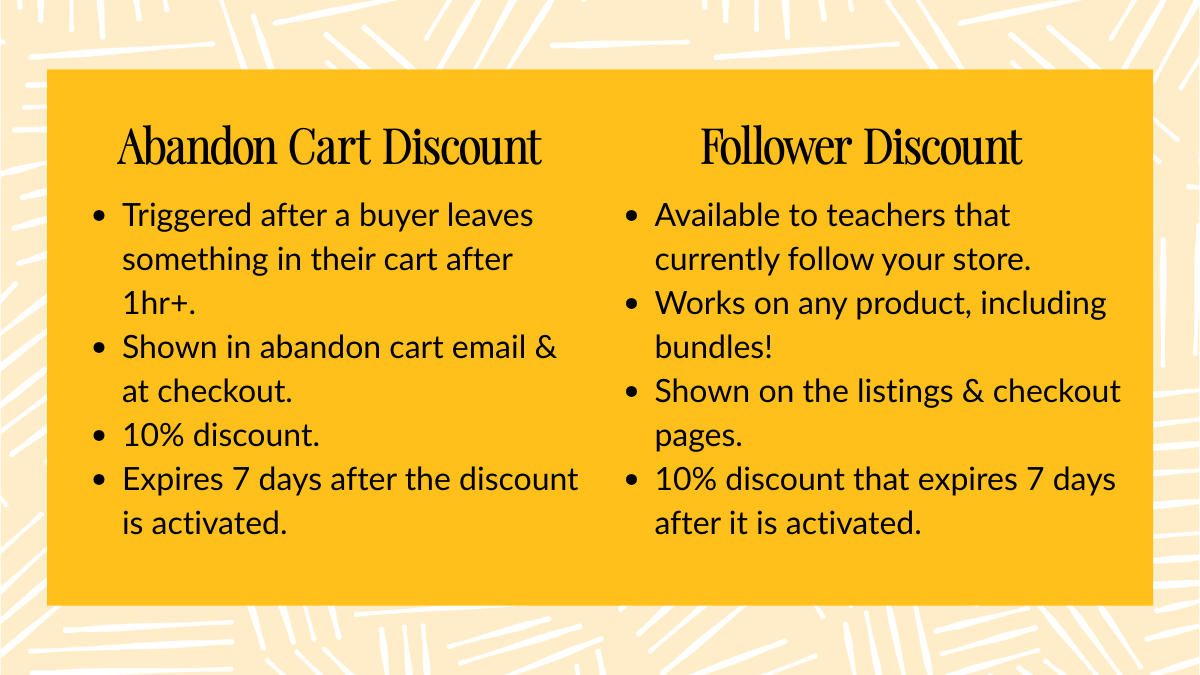
Once you're logged into TPT, click on the house or store icon. At the bottom of the drop down menu, select "Promotions" and then click "Discounts". This will take you to the Discounts page where you can activate and manage discounts.
The setup process is intentionally simple. From what was discussed in the webinar demo and blog post, you click on "Add new discount" and choose which type of discount you want to activate (abandon cart or follower). Once you've activated the discount, it will appear in the Active Discounts table.
If you decide to stop a discount early, TPT said that you can click the X next to it to deactivate it immediately. When the discount ends, it moves to your "previous discounts" list. You can always activate another one later!
What buyers see when a discount is available
TPT shared that eligible buyers will see discounts in a few places:
- On your product listing page, near the price (between the price and "Add to Cart")
- In their cart or at checkout
- In abandon cart emails (only for abandon cart discounts)
There are no promo codes involved. Buyers simply click to check a box to automatically apply the 10% discount. Once clicked, their cart order will automatically be updated.
Can discounts stack with sales or other discounts?
TPT did address this great question asked by a seller. Here's what they said:
Discounts do not stack with other discounts or site-wide sales. Buyers can use one discount from your store per order. If a product is already on sale (like during the site-wide sale), TPT won't show an additional discount to protect pricing.
Now, if a buyer qualifies for both discounts from your store, TPT says they'll see all available options, with the best discount shown first.
Can buyers use a seller discount more than once?
Nope! In the webinar Q&A, TPT explained that Seller Discounts are one-time use per discount window. This means that if you activate a discount now, a buyer can use it once. If you activate another discount later, that's considered a new offering, and they could be eligible again.
Where you can see how your discounts are performing?
TPT shared that you can track your performance of these discounts. However, you cannot track this in your dashboard. You'll have to go to a different place to see these stats. Hopefully this changes in the future!
In the same location as where you set up the discounts, you'll see the performance tracked at the top of the page. This includes:
- Total buyers who used the discount
- Sales revenue from the discounted orders
- Marketing cost (the total value of discounts given)
Now, if you're like me, you're wondering what the "marketing cost" means. Here is an example that they gave to help us understand what this number represents: If a $10 resource sells for $9 because of a 10% discount, the $1 difference is shown as a marketing cost.
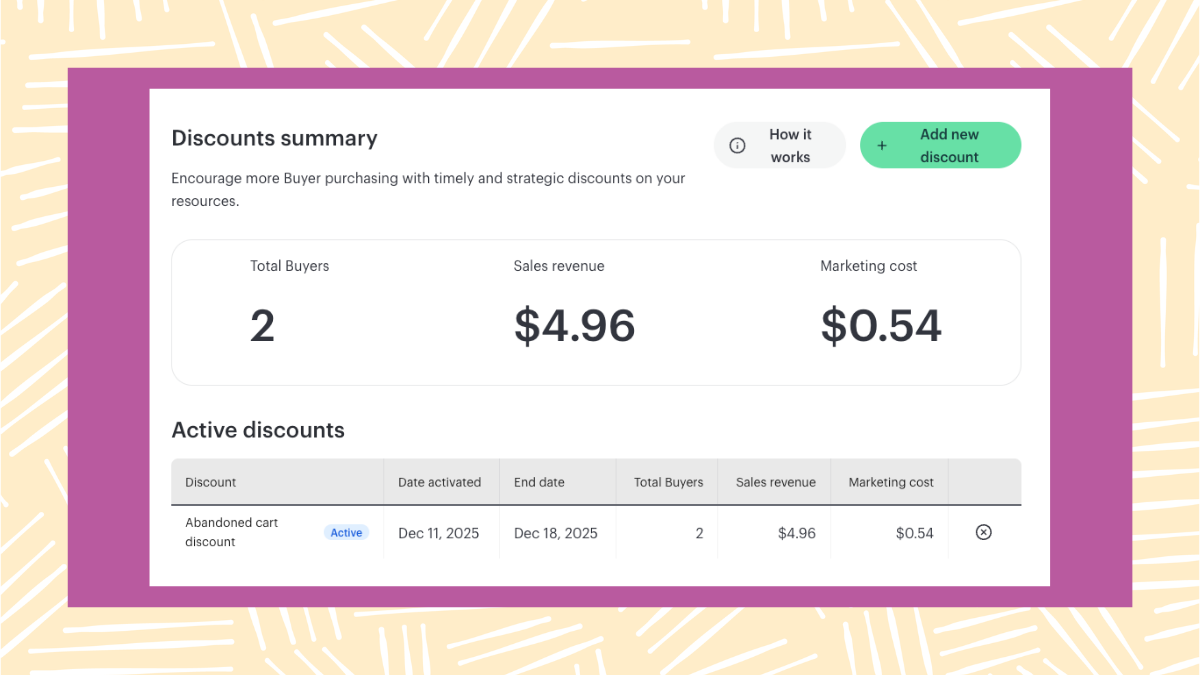
You'll also see a summary on your Seller Dashboard with discount-led sales and marketing costs (monthly and year-to-date).
Seller Discounts are TPT's built-in way to offer savings without promo codes or extra tools. Right now, sellers can choose between an abandoned cart discount or a follower discount, turn them on from the Promotions menu, and track results directly in their discounts dashboard.
It is important to note that this is an early version of the feature. TPT is already working on additional discount options for the future. If you have any feedback, suggestions, comments, etc. please email them at support@teacherspayteachers.com. They read every single one and appreciate seller insights!
Do You Want a FREE List of Words & Phrases to Add to Your TPT Listings That Will Make Them Stand Out?
Join my email list and I'll send you my free Big List of Powerful Keywords and Phrases that teachers are ACTUALLY searching for. You can add these to titles, descriptions, thumbnails & more!
We hate SPAM & promise to never send it. Your contact information is safe and never shared.
TPT for Beginners Coach

